
Password Protected Rar File
If forgot RAR password, how can you unrar or unzip rar file?
Probably you cannot find a way to directly unzip encrypted rar archive, but as long as you retrieve RAR password, it would be possible. Don't you think so? Now the article will talk about this problem from this point of view in two parts.
So, you might want to try tricks to crack password of a zip file without using any tool. Remove Password from Zipped File Online. There are options either to remove or recover the password of zip files online without using any software. Here you can remove the password of the zip file. Normally this method is to convert a rar file into a zip file. Today we post Best Methods of Trick to Hack, Unlock or extract password protected.rar or winrar files. It Offers one of the Security of your File via Password. If you Forgot & you need to open protected files but you don’t have pass of it so by our steps you easily open this.
How to Retrieve Forgotten RAR File Password?
Free notepad, RAR Password Genius Standard and Professional version would be used in this part to retrieve RAR file password. But all of them could recover all kinds of RAR password. Surely it is not. Follow article in this part please and find the best way for you to get RAR password.
3 Ways to Retrieve RAR File Forgotten Password
Way 1: Retrieve RAR Forgotten Password with Notepad
Notepad is common and free for everyone to use on computer. Just type several commands in notepad and run it, you would probably find RAR password, because it is only available for numeric RAR password. It is still worth a try if you don't know anything about RAR forgotten password.
1-1 Type commands in new notepad and save it rar-password.bat.
The commands consist of lot of lines, so now I will not list them. If you want to get more information or copy the command to use, just go to see the article free way to find rar password.
1-2 Double-click bat file and open a command prompt window.
1-3 Input RAR file name and press Enter to type RAR file path.
Look at RAR file properties and get its name and path. Type them in appropriate location in opening window.
1-4 Press Enter again in window to find specified RAR file password.
Once you press Enter, commands in bat file will run to find password for RAR file you just specify name and path. Probably instantly, or a period of time later, you would get RAR file password. But don't be disappointed. There are still another two utilities that can easily and fast recover RAR password in following.
Way 2: Retrieve RAR Password with RAR Password Genius Standard
If you have only one computer used to retrieve RAR password, RAR Password Genius Standard is a better choice. If there is not only one computer in Local Area Network can be used, I would recommend you way 3 to get RAR password faster with Professional version.
2-1 On RAR Password Genius information page, choose Standard version and install it on computer.
2-2 Add encrypted RAR file with Open button after you run RAR Password Genius Standard.
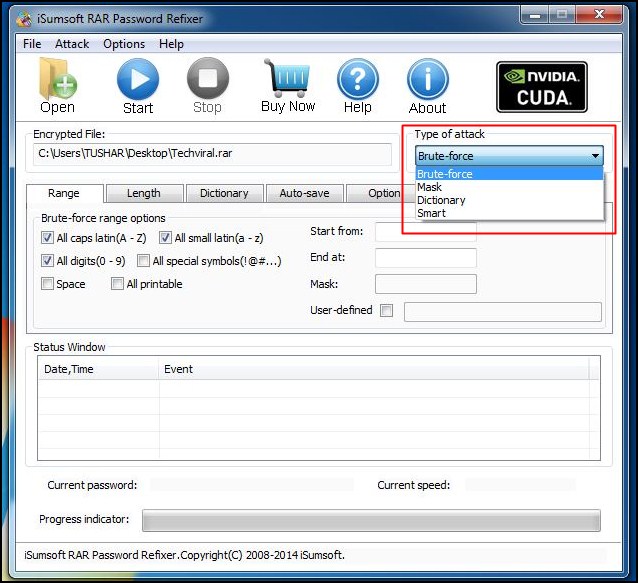
2-3 Set password attack type, password range, length, mask or dictionary path etc parameters.
2-4Start to retrieve RAR password with password attack type you choose.
How much time it would cost?
It would depend on RAR password complexity, password attack type you choose and parameters you set. So besides password complexity, there are still two factors we could control to accelerate RAR password recovery.
Way 3: Retrieve RAR Password with RAR Password Genius Professional
Different from way 2, RAR Password Genius Professional would largely improve RAR password recovery speed by mainly creating password recovery client program run on other computers in same LAN (Local Area Network). Similarly, you can set password recovery range and length too on Professional version.
Step 1: Install and run RAR Password Genius Professional on your PC.
Step 2: Create and run client program iSunshare RAR Peer on other PCs in LAN.
1. Click Make Peer button on RAR Password Genius Professional and you would get installation file of client program instantly.
2. Send the installation file to other available computers in same LAN, and install then launch iSunshare RAR Peer.
:max_bytes(150000):strip_icc()/rar-files-5995b3a4d088c00011497315.png "Password Protected Rar File")
Tips: iSunshare RAR Peer is not working now, until it receives information from main program RAR Password Genius Professional.
Step 3: Import encrypted RAR file into RAR Password Genius Professional and set password range/length.
Unlock Password Protected Rar File Online Free
It is the same to Standard version. But only password range and length you can choose to shorten password recovery time in Professional version.

Step 4: Start main program and client programs work to retrieve RAR password together.
1. Don't be hesitated to click Start button on RAR Password Genius Professional.
2. If the network is no problem, iSunshare RAR Peer on all computers in the LAN would begin to work. All of them would help to check possible passwords one by one according to the range and length you set.
3. Until RAR file password is recovered and pops up on RAR Password Genius Professional, client program iSunshare RAR Peer would be back to status 'Not Work'.
Maybe it seems complex when you choose RAR Password Genius Professional. But in fact, what you need to do more is just creating and installing client program in the LAN. And sometimes you would don't have to do by yourself if you can call others for help. Besides, if the encrypted RAR file is protected with powerful or complex password, one computer is not enough to find RAR password in short time. What you can do is to let more and more accessible computers join in RAR password recovery. So in order to unrar encrypted RAR file soon, RAR Password Genius Professional is a good choice.
How to Open and Unrar Encrypted RAR File?
After trying to retrieving RAR password with above three ways, believe you have had encrypted RAR file password in hand. Now in this part, just use password to open and unrar encrypted RAR file.
1. Double-click encrypted RAR file and open it in WinRAR etc compression software.
2. Click Extract to button on toolbar, and confirm location to save RAR files after unraring archive. Click OK.
3. Type RAR file password in input box and click OK to unrar rar file.
Instantly, encrypted RAR archive is unzipped successfully and you can edit documents stored in it.
Related Articles:
You may be in the position in which you have download something in the RAR file format, but when you atempt to open and extract it, a display appears asking for a password before proceeding. This means that this file is encrypted and locked. You may not have the password readily available. Your best availabe option is to use a program such as RAR Password Unlocker to decrypt the file and retrieve the password for you, so that you can extract the file contents.
Step 1
Download the free trial version of the RAR Password Unlocker 3.2 software (see 'Resources' section below).
Step 2
Step 3
Click the 'Open' button in the menu task bar of the program to browse for the RAR file that you want to open.
Step 4
Choose the RAR file in the 'Open File' window, then click on 'Open.'
Step 5
Select the 'Brute-force Attack (Trying All Possible Combinations)' option in the program.
Step 6
Click on the 'Start' button in the menu task bar to begin the process of decrypting the file.
Rar File Extractor
Click 'OK' when the dialog box appears with the decrypted RAR file password. Now you can use this password to open and extract the RAR file.
Tips
- Other programs apart from RAR Password Unlocker 3.2 that perform a similar function are the
- Archive password recovery 2.20 and and RAR Password Cracker.
Items you will need
- RAR Password Unlocker 3.2 software
- RAR file
Video of the Day
- file folders image by Kathy Burns from Fotolia.com